Where To Find Linkedin Url On App Android

Alright, let’s be honest for a second. You’ve probably been there: someone asks for your LinkedIn profile, and you scramble through your phone like a detective on a sugar rush...

Alright, let’s be honest for a second. You’ve probably been there: someone asks for your LinkedIn profile, and you scramble through your phone like a detective on a sugar rush. The panic is real, but it’s also totally unnecessary.
Finding your LinkedIn URL on the app for Android is actually a tiny, joyful treasure hunt. And once you know the secret handshake, you’ll feel like a networking ninja. Let’s dive into this ridiculously simple quest together!
First, crack open your LinkedIn app on that trusty Android device of yours. I’m talking about the little blue square with the “in” that lives on your home screen. Go on, tap it—I’ll wait.
Must Read
Now, look at the very top of your screen, on the left side. See your profile picture or that tiny generic avatar? Tap that little guy. It’s your gateway to glory. Seriously, this is the easiest step you’ll take all day.
Once you tap it, you’ll land on your own profile page. Yes, the one you’ve been meaning to update for six months. But don’t worry about that right now. Just take a deep breath and look at the screen.
The Hunt for the Magical Three Dots
Right below your name, headline, and location, you’ll see a row of options like “Open to,” “Add section,” and “More…” But the real prize is the three little dots (they look like a sideways “more” menu). Tap those dots—it’s the key to unlocking your URL.
A menu will pop up, and at the very bottom, you’ll see “Copy link to profile.” See it? That’s your golden ticket. Tap it once, and your entire profile link is now safely copied to your clipboard. Boom. You did it.
You can now paste that link anywhere—a text message, an email, or even in a group chat where you’re bragging about your latest work win. It’s like handing someone a digital business card, but way cooler because you didn’t have to dig through your bag.
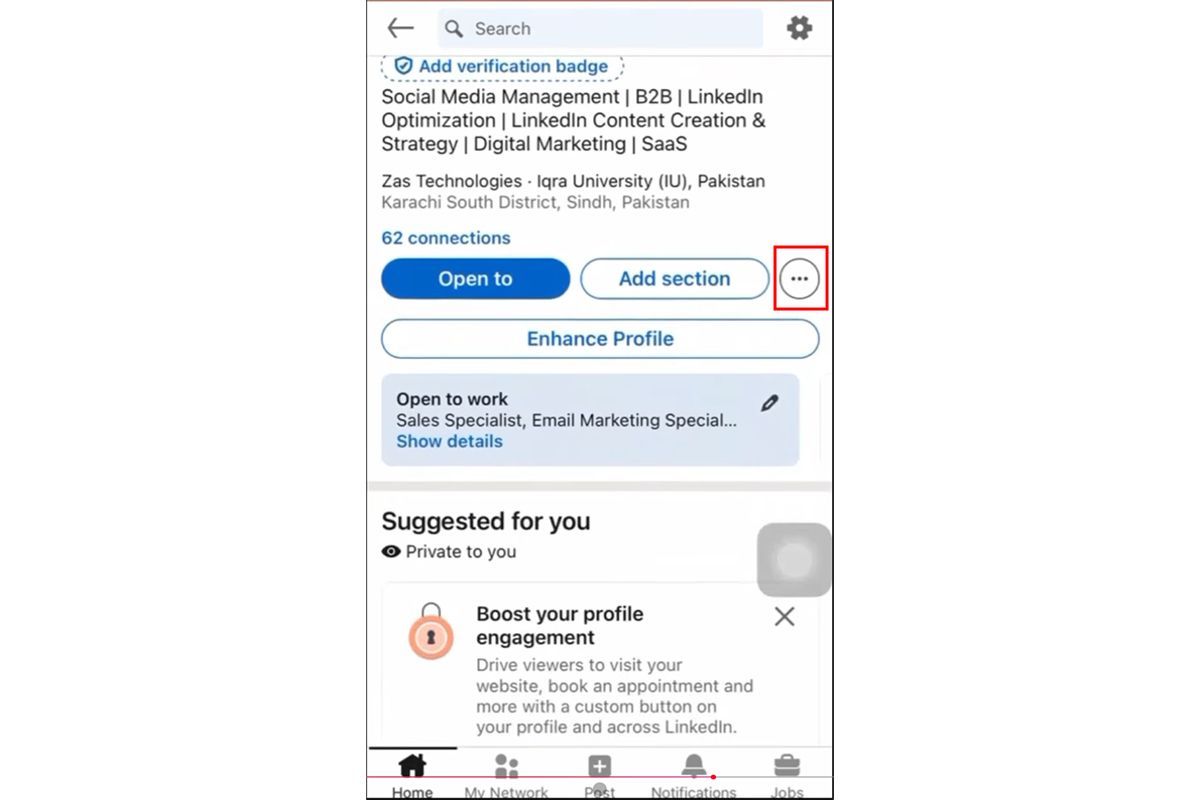 How to Find Your LinkedIn Profile URL
But Wait, There’s a Customization Party!
Here’s where it gets even more fun. That long, ugly URL with random numbers and letters? You can customize it to make it your own. Who wants a link that looks like a robot sneezed? Not you.
After you’ve found your profile, tap the three dots again (yes, they work double duty). Then select “Edit public profile & URL.” This is where you can change the end of your link to something like your name, a nickname, or “HRNinja.” Go wild, but keep it professional.
Now your link is not only easy to find, but it’s also yours. It’s like putting a custom license plate on your digital car. People will think you’re a tech wizard. (Spoiler: you are.)
Why This Little Trick Makes Life More Fun
Think about it: you’re no longer that person who sends a vague “I’ll send it later” text. You’re the person who fires off a clean, personalized link in under ten seconds. That is power.
It also means you can brag without being awkward. Say you’re at a coffee shop and you meet someone cool. You can literally whip out your phone, tap a few times, and share your professional story. It’s like a magic trick, but with career benefits.
 How to Find Saved Posts and Jobs on LinkedIn - Guiding Tech
And let’s be real—knowing where to find your own stuff makes you feel like a grown-up. It’s a tiny triumph in a world full of passwords, two-factor authentication, and lost files. You deserve that tiny victory.
The Secret Life of Your URL
Your LinkedIn URL is more than just a link. It’s a bridge between your present and your future. Every time you share it, you’re opening a door for someone to say, “Hey, I’d love to work with you.”
Think of it as a digital handshake that never gets tired. It doesn’t get sweaty or nervous. It just sits there, ready to connect you with opportunities you haven’t even imagined yet. How cool is that?
So the next time you’re fumbling for your profile link, remember: tap the picture, hit the three dots, copy the link. It’s a three-step dance that takes about four seconds. You’ve got this.
An Uplifting Final Word
You now hold the key to one of the easiest, most joyful little tasks in the digital world. And if you can master this, imagine what else you can tackle today. You are capable, you are resourceful, and you are just one link away from your next big thing.
Go ahead, open your LinkedIn app right now. Find that URL, customize it, and send it to someone who matters. Watch what happens. You might just inspire yourself to learn more, connect more, and conquer more. Now go forth and link with a grin!
