What To Do If You Forgot Your Spotify Password

Ever found yourself in the middle of a workout, cooking up a storm in the kitchen, or even daydreaming at work, only to realize you've forgotten your Spotify password? It's li...
:max_bytes(150000):strip_icc()/001_fix-spotify-login-error-6830691-5d5b70fb209b4b9bbc6e3154108ff3e4.jpg)
Ever found yourself in the middle of a workout, cooking up a storm in the kitchen, or even daydreaming at work, only to realize you've forgotten your Spotify password? It's like trying to remember the name of that one actor from your favorite childhood movie - it's on the tip of your tongue, but just won't come out. Don't stress, we've all been there. Let's dive into the easy-peasy lemon squeezy way to retrieve your password, and why you should care about keeping it safe.
First Things First: Reset That Password!
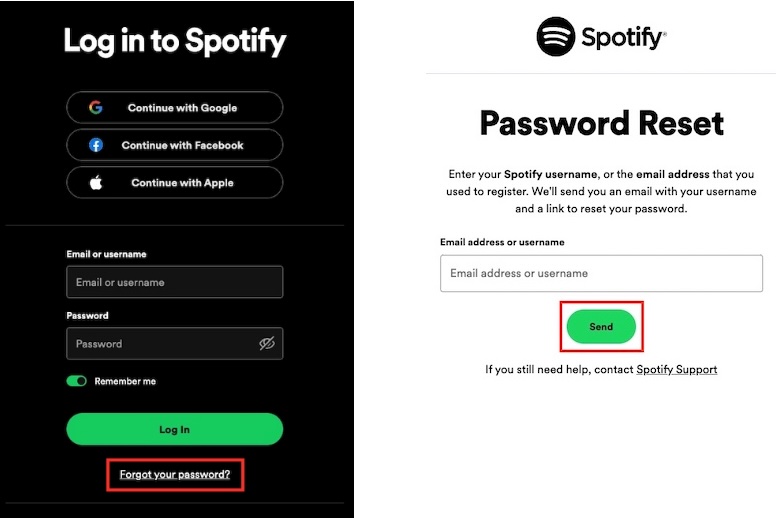
Alright, let's get you back to your tunes in no time. Head over to the Spotify login page and click on 'Forgot your password?' You'll be asked to enter the email address or username associated with your account. Once you've done that, Spotify will send a password reset link to your inbox.
Now, here's a little tip: If you've got multiple email addresses linked to your Spotify account, make sure you're checking the right one. It's like trying to find your car in a massive parking lot - you know it's there, but it's easier to spot if you're in the right section.
Must Read
When Life Gives You Verification Codes...
After clicking the reset link, you'll be asked to enter a verification code sent to your email. Think of this as your secret handshake with Spotify - it's their way of making sure you're who you say you are. If you're having trouble finding that email, try searching for 'Spotify' in your inbox, or check your spam folder - sometimes emails can get lost in there, like that one sock that always goes missing in the dryer.
Once you've entered the code, you'll be prompted to create a new password. Make it something you'll remember, but not too obvious - no birthdays or pet names, please. This is like choosing a lock combination for your diary; you want something secure, but not so secure that you'll forget it in a week.
Why Keeping Your Password Safe Matters
So, why should you care about keeping your Spotify password safe? Well, imagine your password is the key to your personal music fortress. If someone else gets their hands on it, they could be blasting 'Never Gonna Give You Up' on repeat in your account, or worse, changing your password and locking you out entirely. Not cool, Rick Astley.
 How to Change or Reset Your Spotify Password - Pazusoft
Keeping your password safe also helps protect your personal information. Your Spotify account is linked to your payment details, so if someone gains access, they could potentially make unauthorized purchases. It's like leaving your front door unlocked - sure, it's a hassle to remember to lock it every time you leave, but it's a whole lot better than coming home to find your TV missing.
Password Tips for the Win
Now that you've reset your password, let's make sure you don't forget it again. Here are a few tips to keep your password safe and secure:
- Use a Password Manager: These tools generate strong, unique passwords for you and store them securely. It's like having a personal bodyguard for your passwords - they do all the heavy lifting, so you don't have to.
- Enable Two-Factor Authentication: This adds an extra layer of security to your account. When you log in, you'll need to enter a unique code sent to your phone or generated by an authenticator app. It's like having a bouncer at your personal music club - only you and your phone get to decide who's allowed in.
- Change Your Password Regularly: Just like rotating your wardrobe, changing your password regularly helps keep your account fresh and secure. Aim for every three to six months - it's like giving your music library a spring clean.
And there you have it - you're back to jamming out to your favorite tunes, and you've got the tools to keep your account safe and sound. So next time you find yourself humming the 'Forgot my password' tune, you'll know exactly what to do. Happy listening!
:max_bytes(150000):strip_icc()/001_fix-spotify-login-error-6830691-5d5b70fb209b4b9bbc6e3154108ff3e4.jpg&description=What+To+Do+If+You+Forgot+Your+Spotify+Password)