How To See When A Website Was Created

Unveiling the Mystery: When Was That Website Born? Alright, gather 'round, dear internet sleuths. Today, we're going to tackle a question that's been baffling minds since the...

Unveiling the Mystery: When Was That Website Born?
Alright, gather 'round, dear internet sleuths. Today, we're going to tackle a question that's been baffling minds since the dawn of the world wide web: How to see when a website was created? Now, don't go expecting some magical, top-secret hack. We're talking about the web, not the Matrix. But fear not, for I have a few tricks up my sleeve that'll make you feel like a digital detective in no time.
First Things First: Why Bother?
You might be wondering, "Why on earth would I want to know when a website was created?" Well, my friend, there are a myriad of reasons. Maybe you're curious about how long your favorite blog has been spewing wisdom (or nonsense) into the void. Perhaps you're a budding web developer, eager to see how the big dogs do it. Or maybe, just maybe, you're a secret time-traveling agent, and you need to know if this website predates the invention of the flux capacitor. Whatever your reason, I've got your back.
Method 1: The Easy Peasy Way
Alright, let's start with the simplest method. Some websites are kind enough to display their creation date right there on the homepage. It's like they're saying, "Hey, look at me! I'm a shiny new website, and I'm proud of it!" So, give it a quick once-over. If you see a date, congratulations! You're done. If not, don't worry. We've got more tricks up our sleeves.
Must Read
Method 2: The Wayback Machine
Now, let's bring in the big guns. Introducing the Wayback Machine, the time-traveling web crawler that's been hoarding snapshots of the internet since 1996. This bad boy has saved over 450 billion web pages, making it an invaluable tool for our little investigation. Here's how to use it:
- Head on over to https://archive.org/web/.
- In the search bar, type in the URL of the website you're investigating.
- Hit enter, and you'll be greeted with a calendar-like interface, showing you when the Wayback Machine first captured that website.
It's like unearthing a digital fossil! But remember, the first capture date might not be the exact creation date. The website could have been live for a while before the Wayback Machine got its hands on it. Still, it's a pretty good starting point.
Method 3: The Whois Database
Alright, let's get a bit more technical. The Whois Database is a public database that stores information about who registered a domain name and when. Here's how to use it:
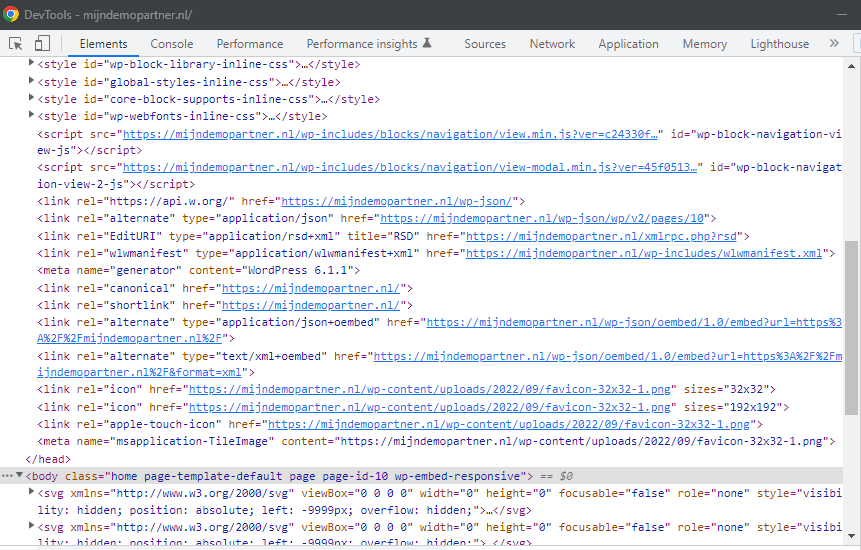 How can you tell that a website was created with WordPress?
- Head on over to https://www.whois.com/.
- In the search bar, type in the domain name (e.g., example.com).
- Hit enter, and you'll see a bunch of technical jargon. Scroll down to the "Creation Date" field. That's when the domain was registered.
Now, here's where things get a bit tricky. The creation date of the domain doesn't necessarily mean the website was created on that day. The website could have been live before the domain was registered. But hey, it's still a useful piece of the puzzle.
Method 4: The Google Trick
Last but not least, let's try a little Google trick. Sometimes, Google can give us a clue about when a website was first indexed. Here's how:
- Head on over to Google and type "site:example.com" (replace "example.com" with the website you're investigating).
- Hit enter. If the website has been indexed, you'll see a bunch of results. Look at the bottom of the page. You might see a date that says something like, "Results 1 - 10 of about 1,000 for site:example.com (0.47 seconds)." That date could give you a clue about when Google first indexed the website.
Again, this isn't a perfect science. Google might have indexed the website long after it was created. But hey, every little bit helps, right?
And That's a Wrap!
And there you have it, folks! Four methods to help you unravel the mystery of when a website was created. So go forth, internet detectives, and happy sleuthing! Just remember, if you find a website that's older than dirt, don't blame me if it gives you the heebie-jeebies.
