How To Cool Your Phone Down

We’ve all been there, right? You’re in the middle of a hilarious video, navigating a tricky turn in your GPS app, or catching up on a friend’s photo dump, and suddenly your ph...
We’ve all been there, right? You’re in the middle of a hilarious video, navigating a tricky turn in your GPS app, or catching up on a friend’s photo dump, and suddenly your phone feels like a tiny, toasty brick. It’s an oddly universal moment—a shared little panic that makes this topic surprisingly enjoyable to talk about. Whether you’re a serial multi-tasker, a mobile gamer chasing high scores, or just someone who hates the idea of melting their daily driver, knowing how to cool your device down is a genuinely useful life skill. The main purpose is simple: to protect your phone’s battery health, prevent performance lag, and avoid that dreaded “temperature warning” that shuts everything down. For a photographer shooting in the sun, it means getting one more great shot. For a parent waiting in a hot car, it means keeping the kid’s show playing. It’s practical, immediate, and strangely satisfying.
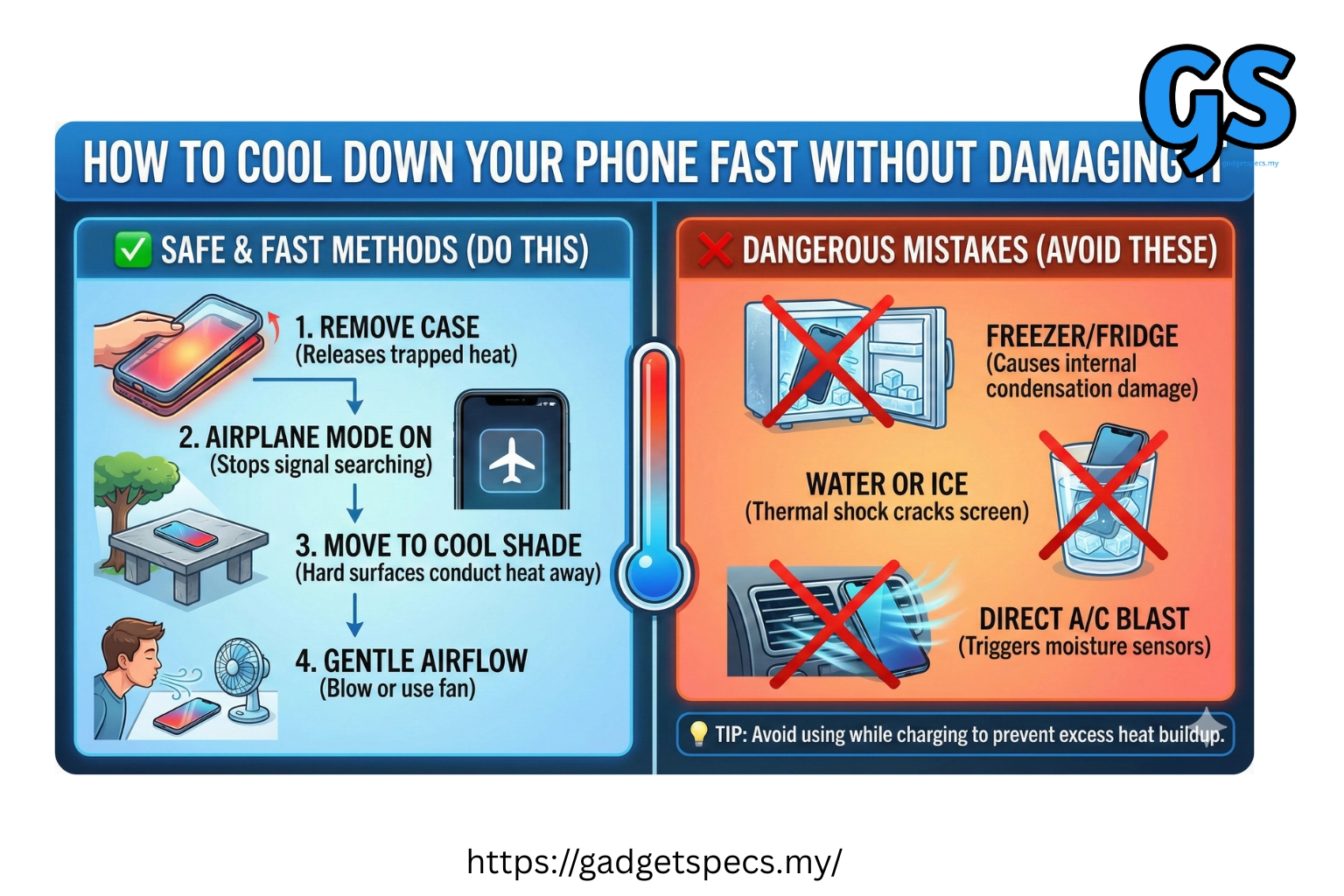
First, let’s get the obvious one out of the way: stop using it. I know, it sounds almost rude, but it’s the single most effective step. Your phone’s processor generates heat when it’s working hard—think of it as a tiny engine. If you’re streaming, gaming, or even charging, you’re adding fuel to the fire. Especially avoid charging while using heavy apps. It’s like trying to run a marathon while eating a heavy meal. So, the first tip is to put the phone down. Turn off the screen. Let it breathe. Even five minutes of inactivity can drop the temperature significantly.
Next, check your environment. The classic mistake is sticking a hot phone in the fridge or freezer. Please, do not do this. Rapid temperature changes can cause internal condensation, which is far worse than heat damage. Instead, think of gentle cooling. Move your phone out of direct sunlight, away from a car dashboard, or off a laptop’s warm charging pad. A cool, shady spot—like a table away from a window or next to a gentle fan—is your best friend. If you’re outside, even sliding it into the shade of your bag or a cooler (not inside the cooler, just near it) helps hugely.
Must Read
Take a look at your case. A thick, silicone or leather case acts like a winter coat for your phone, trapping heat inside. If your device is feeling unusually warm, pop that case off immediately. The increased surface area allows heat to dissipate into the air much faster. Many cases are also designed with tiny air gaps or even cooling gel layers—look for those in the future. For now, going naked (phone-wise!) for ten minutes is one of the fastest ways to bring the temperature down. It’s a simple fix that often gets overlooked.
 Stop Phone Overheating While Gaming: 5 Ways to Chill Out
Think about what your phone is doing. Even when the screen is off, background apps can be secretly cooking your processor. Open your phone’s settings and check the battery usage. Close any power-hungry apps you’re not using—especially navigation, social media, or video streaming. Turn off Bluetooth, Wi-Fi, and mobile data if you don’t need them, as these radios generate heat when scanning for signals. Lowering your screen brightness is another huge help, since the display is a major heat source. You can even switch to Airplane Mode temporarily; it’s the digital equivalent of a deep breath for your phone.
Finally, prevention is the best cure. Avoid leaving your phone in a parked car in summer—it’s basically an oven. When charging, use a quality cable and a charger that matches your phone’s specs. Cheap chargers can cause inefficient charging, which creates extra heat. Also, consider using a slow charger at night instead of a super-fast one if you don’t need the speed; it generates far less warmth. And if you regularly push your phone to its limits, look into gaming-focused accessories, like a clip-on fan. They look a little goofy, but they work wonders. The real takeaway is simple: treat your phone like a friend. Don’t make it work too hard, in too hot an environment, for too long. A little common sense goes a long way toward keeping it cool, happy, and ready for your next adventure.
