How Do I Get Windows Media Player To Play A Dvd?

So, you’ve dusted off a copy of The Matrix from 1999, you’ve got a bowl of popcorn, and you fire up Windows Media Player. Then nothing happens. Or worse, you get a cryptic err...
So, you’ve dusted off a copy of The Matrix from 1999, you’ve got a bowl of popcorn, and you fire up Windows Media Player. Then nothing happens. Or worse, you get a cryptic error message that looks like it was written by a depressed robot. Welcome to the baffling world of modern Windows trying to play a DVD. It’s a tale of corporate grudges, missing codecs, and a software relic that’s been left out in the rain.
The Great DVD Conspiracy
Here’s the brutal truth: Windows Media Player can’t play DVDs straight out of the box on any recent version of Windows. Microsoft removed the DVD playback functionality back in Windows 8 because they wanted you to use their paid “Windows DVD Player” app. It’s like buying a car and discovering the steering wheel costs extra. The company decided that decoding a simple DVD was a “premium feature,” so your copy of The Lion King is now a coaster unless you do some digital spelunking.
You aren't alone. Millions of people have stared at that blank player window, feeling a mix of confusion and betrayal. Remember when DVD playback was just a thing computers did? Those days are as dead as the floppy disk. But don't throw your computer out the window just yet—there are three solid ways to fix this, and none of them involve sacrificing a USB drive to the tech gods.
Must Read
Option 1: Buy the Official “Get-Out-of-Jail” Codec
If you want the laziest fix, Microsoft sells a separate app called “Windows DVD Player” in the Microsoft Store. It costs about $15, which feels like a tax for living in the future. You download it, you install it, and suddenly Windows Media Player remembers how to do its job. It’s like paying a ransom to get your own hand back. The downside? You’re giving Microsoft money for a feature they removed—but hey, at least you won’t have to yell at your monitor.
And here’s a wild fact: this app does not work on Windows 7 or 8, only 10 and 11. If you’re on an older system, Microsoft basically says, “Sorry, you’re on your own.” It’s a weirdly specific insult. But if you want the simplest, most headache-free path, swipe your credit card and be done with it. Your time is worth more than the price of a mediocre pizza.
 How to Play DVDs on Windows Media Player (with Pictures) - wikiHow
Option 2: The Free Medium-Rebels Solution
Don’t want to pay? Fine, be a rebel. Download a free program called VLC Media Player. It’s like the Swiss Army knife of video players—it can play DVDs, scratched discs, old home videos, and probably even read your mind if you hold it right. VLC is completely free, open-source, and it does not need any extra codecs. It just works. You insert the DVD, open VLC, click “Media” then “Open Disc,” and boom—you’re watching Keanu Reeves dodge bullets.
The best part? VLC is actively maintained by a bunch of passionate volunteers who hate proprietary nonsense. It’s the hero we deserve. A surprising fact: VLC has been downloaded over 3.5 billion times worldwide. That’s more than the population of Earth. Every person on the planet could have half a VLC player each. And it will play DVDs on Windows 7, 8, 10, 11, and even on a toaster if you could somehow plug it in. It’s the ultimate “I don’t need Microsoft’s permission” solution.
Option 3: The “Phone-a-Friend” Hack
If you’re feeling really stubborn and want to keep using Windows Media Player specifically (maybe you’re nostalgic for those weird visualizations from 2001), you can install a third-party codec pack. The most famous is the K-Lite Codec Pack. This is like giving your computer a language translator. It installs a bunch of free, legal codecs that let Windows Media Player suddenly understand DVD video. It’s sneaky, it’s clever, and it’ll make your player work like it’s 2006 again.
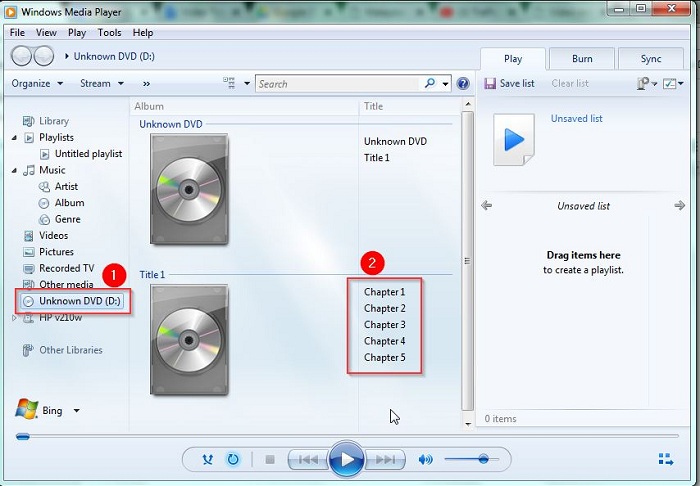
![[Solved] How to Play a DVD with Windows Media Player](https://www.anymp4.com/images/dvd/windows-media-player-dvd/play-dvd-windows-7.jpg) [Solved] How to Play a DVD with Windows Media Player
[Solved] How to Play a DVD with Windows Media Player
But be careful: download the basic version. The “mega” pack will try to install a toolbar that looks like a browser disease. Also, every time Windows does a big update, it might reset your codec settings, forcing you to reinstall. It’s a bit like having a car that needs a kickstart every morning—annoying, but it works. And you get to feel like a hacker for five minutes. Surprising fact: the K-Lite pack has been around since 2004, making it older than some of the people reading this article. It’s an ancient artifact that still slays dragons.
The Final Curtain
So, to summarize: Windows Media Player is a beautiful old jalopy that can’t drive on modern highways without a tune-up. Your best bets are: 1) Pay Microsoft $15 to unlock the feature they took away, 2) Use VLC and join the free revolution, or 3) Install a codec pack and get your hands dirty. No matter which you choose, you’ll be watching DVDs again before you can say “What’s a Blu-ray?”
And remember: none of this is your fault. You’re a normal person trying to watch a movie, not a systems administrator. The tech industry just loves making simple things complicated. Now go pop in that DVD, ignore the error messages, and enjoy the show. Just don’t blame me if you decide to watch Shrek 2 for the 47th time. That’s on you.
