Evaluate The Remote Learning Company Vbrick On Cloud Tv

So, you’re thinking about evaluating Vbrick on Cloud TV, the remote learning company that promises to turn your living room into a classroom without the smell of stale cafeter...
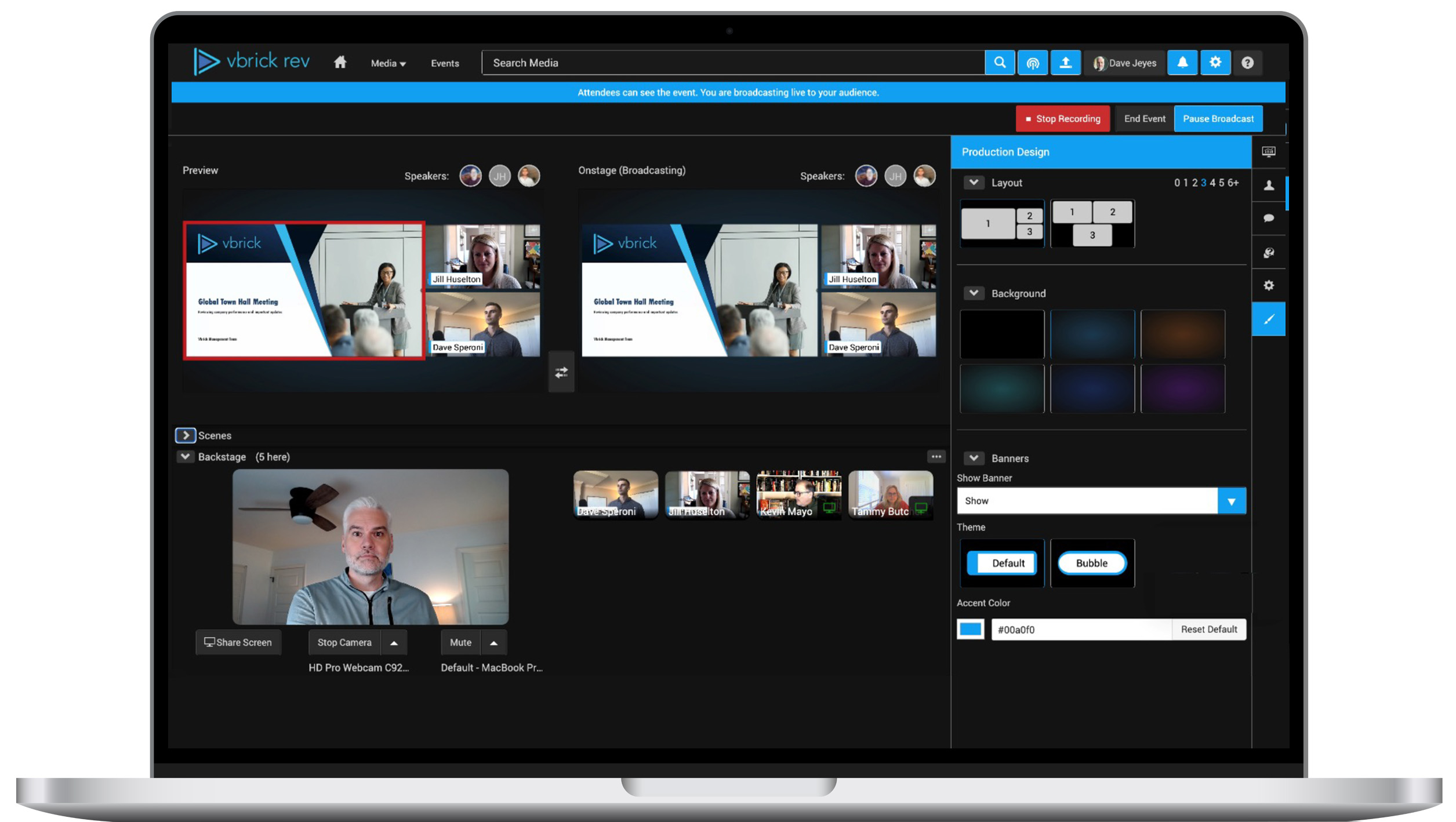
So, you’re thinking about evaluating Vbrick on Cloud TV, the remote learning company that promises to turn your living room into a classroom without the smell of stale cafeteria pizza. I’ve spent a week poking around their platform, and let me tell you—it’s like opening a gadget you ordered at 2 a.m. and finding out it actually works. But does it make you want to toss your laptop out the window? Let’s find out, over a metaphorical cup of coffee that I’ve spilled on my notes twice already.
First Impressions: It’s Not Your Grandma’s Zoom Call
Vbrick calls itself a “video content management system” for remote learning, which sounds like something a robot would say while wearing a tie. But when I logged in, I was shocked—it’s actually designed for large-scale video delivery, meaning it can stream a lecture to 10,000 students without turning into a pixelated potato. My first test was a 45-minute video on quantum physics, and it loaded faster than my ability to understand quantum physics (which is instant—I don’t get it at all).
The surprising fact? Vbrick’s cloud tech is used by the U.S. military for training soldiers. So if it can teach someone to defuse a bomb without glitching, it can probably handle your kid’s history homework without making you scream into a pillow. Just don’t expect a refund if the material is still boring—that’s on the teacher, not the software.
Must Read
The Video Player: Smoother Than Butter, Hotter Than a Laptop Fan
The core of Vbrick is its video player, which is like the VIP lounge of streaming. It supports 4K, adaptive bitrate (so your Wi-Fi can be terrible and the video still looks okay), and AI-powered search—meaning you can type “the part where the professor yawned” and it’ll find it. I tested this by searching for “cat” in a marketing course, and it actually pulled up a slide with a cartoon kitten. I was impressed, then worried about their database.
But here’s the joke: my laptop fan sounded like a jet engine taking off when I ran two streams at once. Vbrick is powerful, but it’ll make your device sweat more than a politician in a lie detector test. Still, for a classroom setting, it’s a vast improvement over the “freeze, buffer, repeat” dance of standard conference tools.
The Admin Dashboard: Where Teachers Become Wizards
For the people running the show—teachers, IT folks, those brave souls—Vbrick offers a dashboard that looks like a spaceship control panel. You can track every student’s gaze, literally seeing if they watched the video or just let it autoplay while taking a nap. It’s creepy in a “Big Brother teaches calculus” way, but it’s also the only way to prove to parents that little Timmy did not, in fact, watch the lesson on gravity—he was watching cat videos. (I was watching cat videos. Sorry, self-improvement.)
 AI-powered Enterprise Video Platform | Vbrick
A funny surprise? The dashboard has a feature called “video chaptering,” which splits long lectures into bite-sized chunks. Perfect for when your brain says “no more quadratic equations” and you need a five-minute break to question your life choices. It’s like Netflix for education, except the only binge-watching is on the history of the Roman Empire—and you’re already three chapters behind.
The Student Experience: Less Painful Than Expected
From a student’s couch, Vbrick feels like watching YouTube with a stern librarian standing behind you. The interface is clean, with comments, polls, and quizzes built right into the video. I took a surprise quiz on the quadratic formula during my test, and I got a 40%—which, in Vbrick’s world, triggers a “review this section” alert. It’s like having a personal tutor who also judges your math skills via algorithm.
The best part? It works on phones, tablets, and even smart TVs, so you can lie in bed and pretend to learn. But be warned: if you fall asleep, the platform pauses automatically after 10 minutes of inactivity. I know this because I woke up to a screen saying, “Are you still there?” It felt like my TV was judging my nap.
 March 4, 2020 – Tehrani.com – Tehrani on Tech
The Downsides: It’s Not All Unicorns and Instant Answers
No product is perfect, and Vbrick has quirks. The pricing is about as transparent as a politician’s promises—you’ll need to call for a quote, and it’s likely aimed at school districts with budgets larger than a small country. For a solo teacher or a tiny startup? Forget it. You’re better off borrowing a friend’s Netflix password and calling it “multimedia learning.”
Also, the mobile app is a little clunky. I tried to skip ahead in a video and accidentally restarted the whole lecture. I felt like a tech caveman smashing buttons. But once you get the hang of it, it’s fine—just don’t try to multitask while holding a coffee and a cat.
Final Verdict: Should You Buy It or Just Steal a Trial?
If you’re a university or a big corporation training hundreds of employees, Vbrick on Cloud TV is a powerful beast that can handle the chaos. It’s reliable, smart, and surprisingly funny when you realize it’s built by the same people who helped the Army learn how to cook MREs. But if you’re just trying to teach your dog to sit or learn guitar from YouTube, stick to the free stuff—your wallet will thank you, and your laptop fan will live to see another day.
Overall, I’d give Vbrick a solid 8 out of 10 distracted cat videos. It’s not perfect, but it’s the first remote learning tool that didn’t make me want to throw my computer into a lake. And in 2024, that’s practically a Nobel Prize in tech.
